Wireless Screen Sharing: Share Up to 12 Screens with DeltaView Connect
July 29, 2026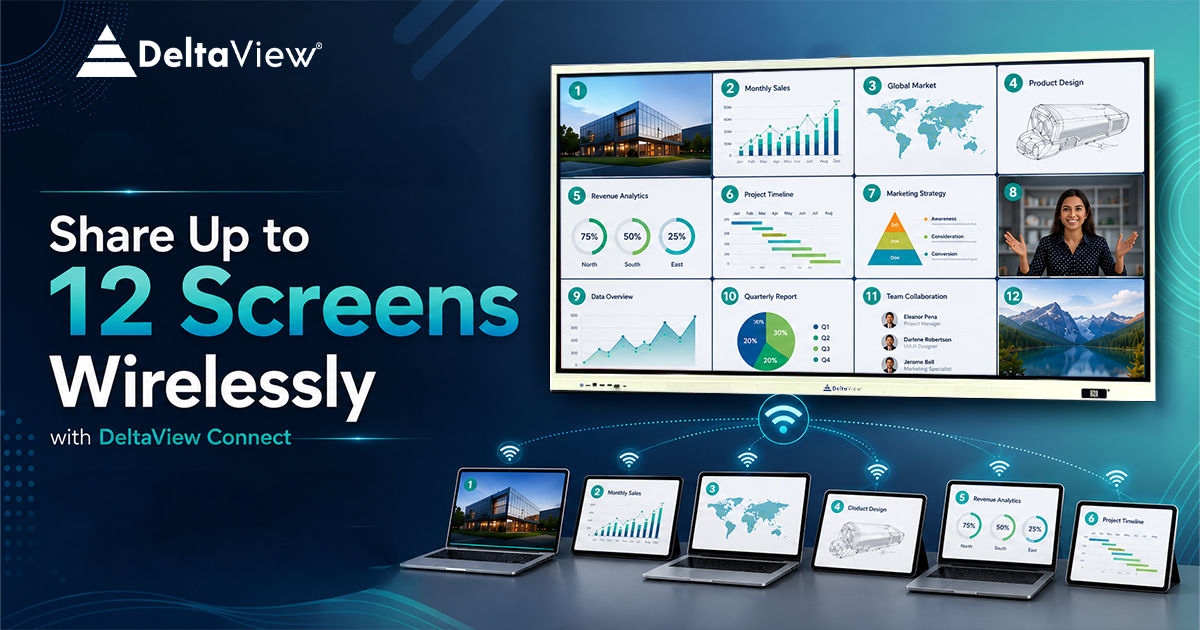
Wireless screen sharing has transformed the way people collaborate in classrooms and meeting rooms. It allows users to instantly share their laptop, tablet, or smartphone screen on an interactive display without using HDMI cables or adapters. With DeltaView Connect, you can take collaboration a step further by sharing up to 12 screens simultaneously, making discussions, presentations, and teamwork more engaging and efficient.
- What Is Wireless Screen Sharing?
- Why Wireless Screen Sharing Matters
- Key benefits include:
- Introducing DeltaView Connect
- Share Up to 12 Screens Simultaneously
- This feature is ideal for:
- Simple and Fast Wireless Connection
- Designed for Education
- Perfect for Business Collaboration
- Cross-Platform Compatibility
- Enhance Productivity Through Collaboration
- Why Choose DeltaView Connect?
- Key Features
- The Future of Wireless Collaboration
- Conclusion
What Is Wireless Screen Sharing?
Wireless screen sharing has transformed the way people collaborate in classrooms and meeting rooms. It allows users to instantly share their laptop, tablet, or smartphone screen on an interactive display without using HDMI cables or adapters. With DeltaView Connect, you can take collaboration a step further by sharing up to 12 screens simultaneously, making discussions, presentations, and teamwork more engaging and efficient.In today’s fast-paced digital world, wireless screen sharing has become an essential technology for classrooms, boardrooms, training centers, and collaborative workspaces. It allows users to display the screen of their laptop, smartphone, tablet, or other compatible device on a larger interactive display—without the need for HDMI cables or adapters.
Unlike traditional wired presentations, wireless screen sharing enables instant collaboration, improves mobility, and saves valuable time. Teachers can invite students to share their work in seconds, while business professionals can present ideas seamlessly during meetings without interrupting the flow of discussion.
As hybrid learning and flexible workplaces continue to grow, organizations are looking for smarter ways to connect people and ideas. This is where DeltaView Connect delivers a reliable, secure, and user-friendly wireless screen sharing experience.
Why Wireless Screen Sharing Matters
Conventional presentation methods often require multiple cables, adapters, and switching between devices. This process wastes time and disrupts productivity.
Wireless screen sharing eliminates these challenges by allowing users to connect instantly over the same network.
Key benefits include:
- No HDMI or VGA cables required
- Faster meeting and classroom setup
- Easy collaboration among multiple participants
- Reduced cable clutter
- Improved mobility and flexibility
- Better engagement for students and employees
- Seamless presentations from laptops, tablets, and smartphones
Whether you’re conducting a classroom lesson, corporate presentation, brainstorming session, or product demonstration, wireless screen sharing helps everyone stay connected and engaged.
Introducing DeltaView Connect
DeltaView Connect is an advanced wireless screen sharing solution designed for DeltaView smart boards. It enables users to connect their devices effortlessly and share content on the interactive display with minimal setup.
One of its standout capabilities is the ability to share up to 12 screens simultaneously, making collaboration more interactive than ever before.
Instead of waiting for one presenter at a time, multiple users can contribute ideas, compare documents, review designs, or participate in classroom discussions simultaneously.
This transforms the interactive display into a true collaboration hub.
Share Up to 12 Screens Simultaneously
The biggest advantage of DeltaView Connect is its 12-screen wireless sharing capability.
Instead of displaying only one device, the software allows up to 12 participants to share their screens at the same time on a single DeltaView Interactive Display.
This feature is ideal for:
- Classroom group activities
- Student presentations
- Team brainstorming sessions
- Corporate meetings
- Design reviews
- Sales discussions
- Technical demonstrations
- Training workshops
Imagine a classroom where twelve students can present their assignments simultaneously, allowing teachers to compare answers instantly.
Or consider a business meeting where different departments display reports, dashboards, presentations, and spreadsheets on one screen without constantly reconnecting devices.
This significantly improves collaboration and decision-making.
Simple and Fast Wireless Connection
One of the biggest strengths of DeltaView Connect is its ease of use.
Users simply connect to the same network, launch DeltaView Connect, and begin sharing their screen.
No complicated installation process or technical expertise is required.
The software is designed to provide:
- Quick pairing
- Stable wireless connectivity
- Smooth screen mirroring
- Low-latency performance
- High-quality display output
This ensures presentations remain smooth even during extended meetings or classroom sessions.
Designed for Education
Educational institutions are increasingly adopting smart boards to create engaging and collaborative classrooms.
DeltaView Connect complements these displays by allowing every student to become an active participant in the learning process.
Teachers can:
- Invite multiple students to present their work
- Compare assignments side by side
- Conduct collaborative discussions
- Display quiz answers instantly
- Encourage peer learning
- Make classroom activities more interactive
Students no longer need to walk to the teacher’s desk with a laptop or connect HDMI cables repeatedly.
Instead, they can share their screen directly from their own device.
This creates a more dynamic and inclusive learning environment.
Perfect for Business Collaboration
Modern workplaces require efficient communication and seamless teamwork.
DeltaView Connect helps organizations conduct productive meetings by enabling wireless presentations from multiple devices.
Business teams can:
- Share presentations instantly
- Compare reports from different departments
- Display dashboards simultaneously
- Collaborate during brainstorming sessions
- Conduct client presentations professionally
- Review designs and documents together
Because switching between presenters is no longer necessary, meetings become shorter, more engaging, and more productive.
Cross-Platform Compatibility
Today’s workplaces and classrooms use a variety of devices.
DeltaView Connect is designed to support multiple operating systems, allowing participants to connect using their preferred device.
Whether users are working from a Windows laptop, Android phone, iPhone, iPad, or other compatible devices, sharing content becomes simple and hassle-free.
This flexibility ensures that everyone can participate regardless of the device they use.
Enhance Productivity Through Collaboration
Wireless screen sharing is no longer just about displaying presentations.
It has evolved into a powerful collaboration tool.
By allowing multiple participants to contribute simultaneously, DeltaView Connect encourages:
- Faster decision-making
- Better teamwork
- Interactive discussions
- Improved knowledge sharing
- Increased classroom participation
- More efficient project reviews
When ideas are shared visually, communication becomes clearer and collaboration becomes more effective.
Why Choose DeltaView Connect?
There are many wireless screen sharing solutions available today, but DeltaView Connect offers a combination of simplicity, collaboration, and performance.
Key Features
- Wireless screen sharing
- Share up to 12 screens simultaneously
- Designed for DeltaView Interactive Displays
- Fast and secure connectivity
- Smooth screen mirroring
- Easy-to-use interface
- Supports classrooms and corporate environments
- Enhances collaboration and productivity
- Eliminates cable clutter
- Quick setup and seamless user experience
These features make DeltaView Connect an ideal solution for organizations looking to modernize communication and collaboration.
The Future of Wireless Collaboration
As digital transformation continues across education and business sectors, the demand for intelligent collaboration tools will continue to rise.
Interactive displays combined with wireless screen sharing are redefining how people communicate, teach, and work together.
Instead of relying on outdated wired connections, organizations are adopting flexible, collaborative technologies that improve efficiency and engagement.
DeltaView Connect is built with this future in mind.
Its ability to connect multiple users, simplify presentations, and encourage real-time collaboration makes it an essential solution for modern classrooms, meeting rooms, and training environments.
Conclusion
Wireless screen sharing has become an essential feature for organizations that value collaboration, efficiency, and ease of use. Whether you’re teaching a classroom of students or leading a business meeting, the ability to connect devices instantly without cables creates a more engaging and productive experience.
With DeltaView Connect, you can share up to 12 screens wirelessly, enabling true multi-user collaboration on a single interactive display. From education to enterprise, it empowers users to present, compare, discuss, and innovate together—without the limitations of traditional wired setups.
If you’re looking to enhance collaboration, streamline presentations, and make the most of your DeltaView Interactive Display, DeltaView Connect is the smart choice for a cable-free and connected future.
FAQs
DeltaView Connect is a wireless screen sharing and collaboration solution that allows users to cast their device screens to a DeltaView Interactive Display without using HDMI cables. It supports Android, Windows, Apple devices, and browser-based casting for seamless collaboration.
DeltaView Connect allows up to 12 devices to share their screens simultaneously on a single DeltaView Interactive Display, making it ideal for collaborative classrooms, meetings, and brainstorming sessions.
DeltaView Connect supports a wide range of devices, including: Android smartphones and tablets Windows laptops and desktops Apple MacBooks, iPhones, and iPads Any device with a modern web browser through browser-based casting
No. DeltaView Connect is a completely wireless screen casting solution. Users can connect and share their screens without HDMI cables, USB cables, or external adapters.
Yes. DeltaView Connect enables wireless screen sharing from Windows laptops to DeltaView Interactive Displays. It also supports reverse casting, allowing content from the display to be shared back to Windows devices.